
Product Architecture
ASP's product architecture can be understood through two main threads:
- Data thread: external alerts enter the platform, are converted into unified resources such as Case / Alert / Artifact, and then move into investigation, enrichment, response, and knowledge capture.
- Collaboration thread: analysts, background automation tasks, LLMs, and Harness Agents work around the same resources instead of maintaining isolated contexts.
ASP is therefore not a single AI feature, but a SOC workspace that connects alert ingestion, resource modeling, automation execution, human-agent collaboration, and governance audit.
Architecture Diagram
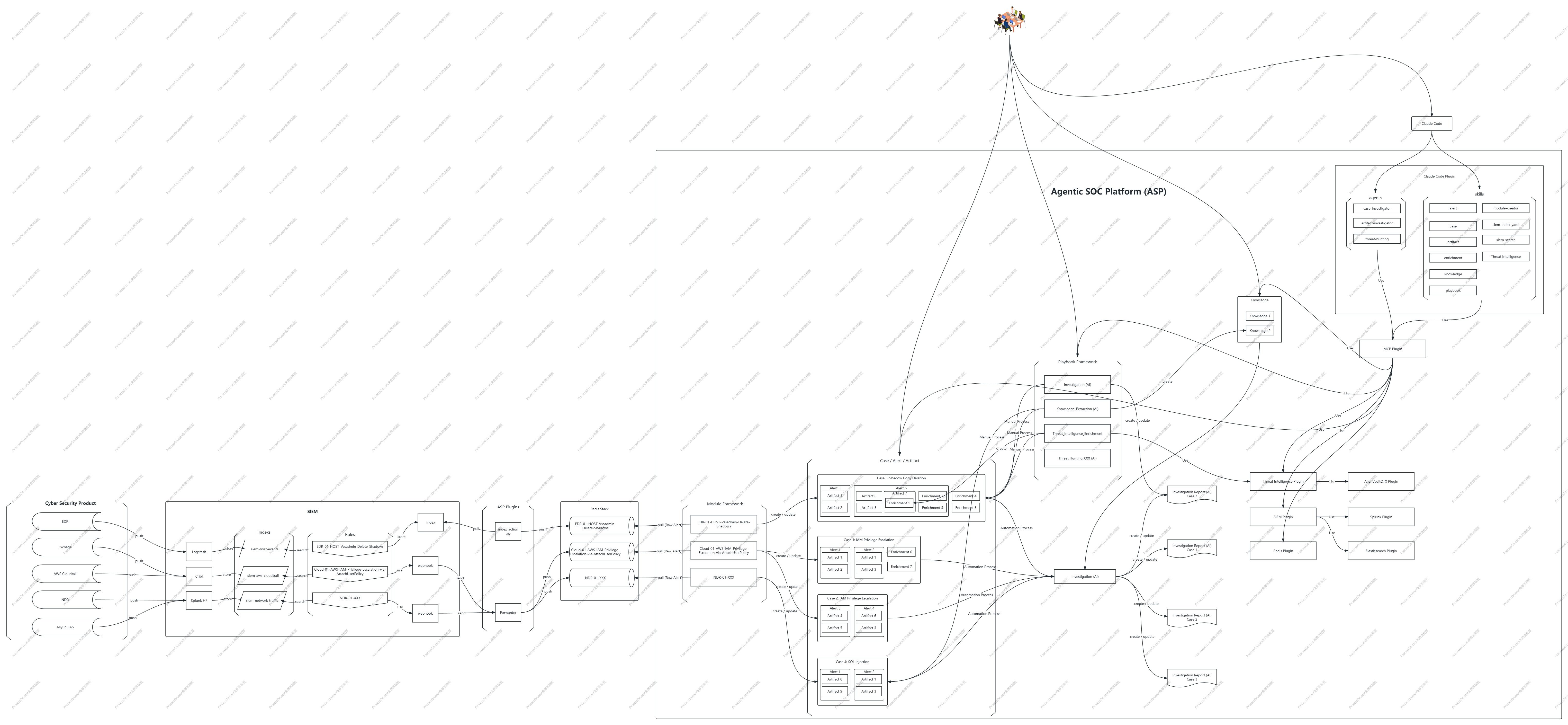
Layered View
| Layer | Description |
|---|---|
| Ingestion Layer | Receives alerts and log context from sources such as SIEM, Webhook, Splunk, and Kibana. |
| Resource Layer | Uses Case, Alert, Artifact, Enrichment, Knowledge, and Playbook as core resources to form a unified security workflow. |
| Automation Layer | Module handles streaming alert processing, Playbook handles user-triggered automation tasks, and LLM generates investigation analysis. |
| Workspace Layer | The frontend provides Dashboard, lists, details, settings, notifications, Comments, and Timeline so analysts can investigate and respond in one interface. |
| Agent Integration Layer | Harness Agents use ASP capabilities through CLI and Skills to read and update Cases, query SIEM, call threat intelligence, and help write Module / Playbook code. |
| Configuration and Governance Layer | Manages runtime and governance settings such as LLM Provider, SIEM, AlienVault OTX, OpenCTI, LDAP, Runtime, users/API Keys, and audit logs. |
Data Flow: From Alert to Case
NDR / EDR / XDR / Cloud
  → SIEM Rule
  → Webhook / ELK Index Action
  → Redis Stream
  → Module Streaming Processing
  → Case / Alert / Artifact
  → AI Analysis / Enrichment / Playbook
  → Knowledge / Response Decision
The responsibility of Module is not simply forwarding logs, but extracting IOC, mapping fields, correlating and aggregating, and compressing raw alerts into Cases that analysts can handle. During processing, ASP still preserves Alert and Artifact as evidence context to avoid losing critical information after noise reduction.
Automation and Background Tasks
ASP's background capabilities consist of multiple asynchronous task types:
| Task | Function |
|---|---|
| ELK Action Worker | Polls Kibana actions from Elasticsearch Action Index and converts them into Webhook alerts. |
| Module Worker | Continuously consumes alert messages, generates or updates Case, Alert, and Artifact. |
| AI Analysis | Schedules LLM analysis after Case creation or update, generating investigation reports and risk recommendations. |
| Playbook Worker | Discovers pending Playbook records and runs tasks such as investigation, knowledge extraction, threat intelligence enrichment, and CMDB enrichment. |
These tasks together transform "alerts entering the platform" into "cases being analyzed, enriched, captured as knowledge, and entering response decisions." Analysts do not need to wait synchronously for every step; they can keep seeing new evidence, analysis results, and execution records in the Case.
Case War Room and Human-Agent Collaboration
Case is the primary user interaction object in ASP, not just a ticket container. It is closer to a war room in SOAR: analysts view evidence, assign responsibility, update status, trigger Playbooks, and conduct discussions and supplement context through Comments within the Case.
This collaborative content is not ancillary information. Comments are referenced by LLM as part of the Case investigation context to understand leads that analysts have confirmed, denied, or supplemented. Case Log / Timeline records status changes, field updates, associated resource changes, and key operation sequences, helping reconstruct the incident handling process and providing a basis for subsequent report generation and timeline analysis.
Harness Agents also enter the same closed loop. Here, Harness Agents include external agent / CLI environments that can host Skills, such as Claude Code, Codex, GitHub Copilot CLI, and Gemini CLI. Users can ask these agents to query SIEM, inspect Artifacts, call threat intelligence, summarize investigation progress, or help write Module / Playbook code based on Case context. Harness Agent output still returns to Case, Knowledge, Enrichment, or Playbook records for analyst review and traceability.
Therefore, a Case's analysis context includes not only Alert, Artifact, and Enrichment, but also human judgment, discussions, Harness Agent assistance, and operation traces. ASP's goal is to place machine-generated evidence, Harness Agent assistance, and human response decisions in the same investigation closed loop.
Typical Workflow
- Splunk / Kibana ingests alerts via Webhook or ELK Index Action.
- Module extracts key fields and IOC, generates or updates Case based on correlation rules.
- Alert preserves detection context, Artifact aggregates entities such as IP, domain, account, host, and file.
- LLM generates investigation report, Enrichment supplements threat intelligence, asset, identity, and historical context.
- Analysts discuss leads, supplement judgments, adjust status in the Case war room, and preserve operation traces through Timeline.
- Users can use Harness Agents to continue querying SIEM, analyzing Artifacts, calling threat intelligence, or generating follow-up investigation and automation suggestions.
- Analysts trigger Playbook to advance investigation, enrichment, knowledge extraction, or response when necessary.
- Playbook results are written back to Case, Knowledge, or Enrichment.
- Comments, Timeline, Harness Agent assistance, and resource context together support subsequent LLM analysis, report generation, and knowledge extraction.