
Custom Console
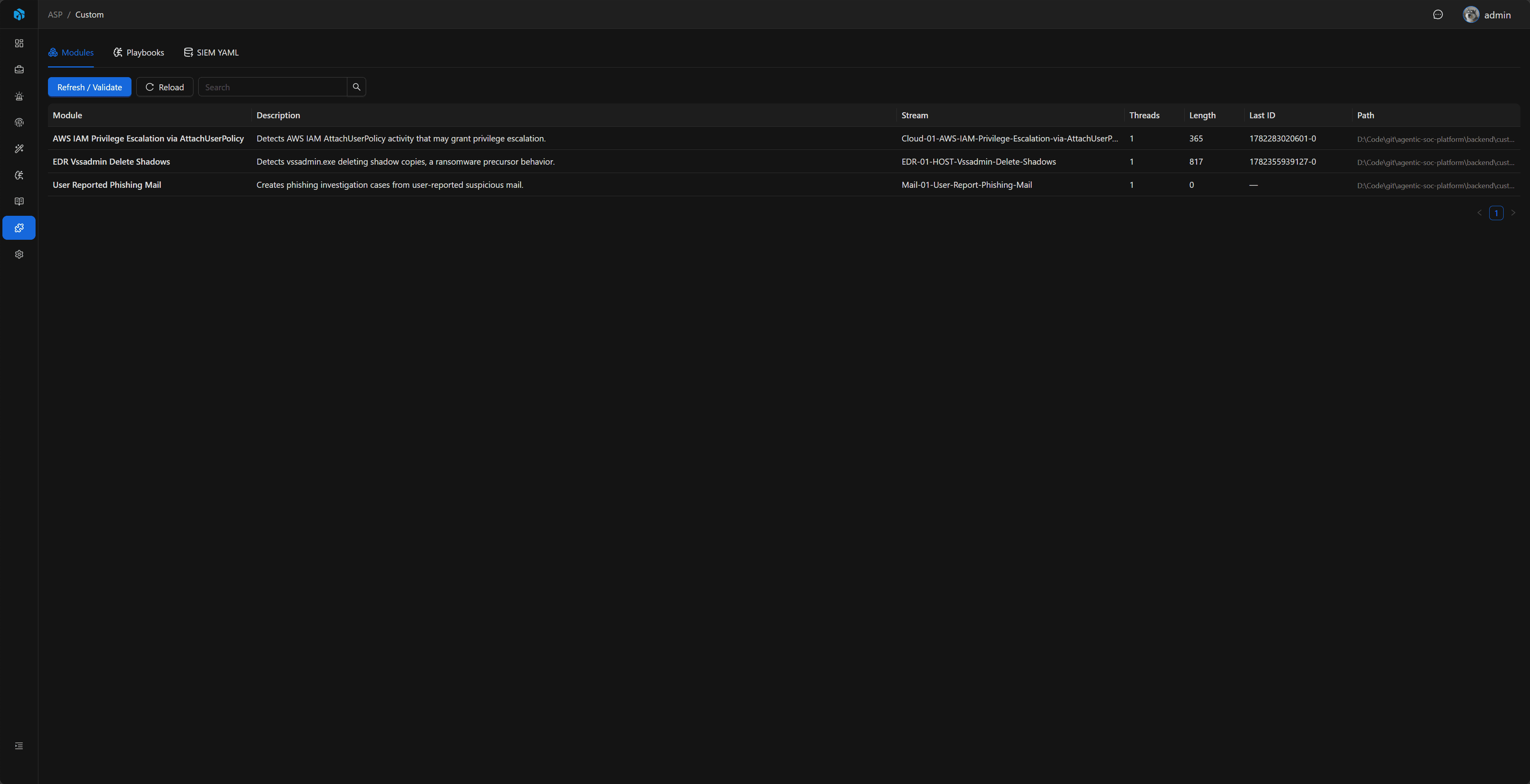
Custom Console is ASP's runtime inspection and validation page for custom development. It helps confirm whether Modules, Playbooks, and SIEM YAML files are loaded correctly in the current environment. It does not replace an editor and does not create complex definitions online; creation and updates should still be done through the code repository, Harness Agents, or related Skills.
To understand how source-tree Mock Data, SIEM YAML, Modules, and Playbook examples work together, start with Custom Examples.
Entry
Custom Console is located in the left navigation as Custom and is available only to administrators.
What It Solves
Custom development spans files, dependencies, Redis Streams, backend registries, and frontend runtime entry points. Custom Console centralizes runtime status so developers can answer:
- Whether a new or modified Module has been discovered.
- Whether the Redis Stream listened to by a Module exists, has messages, and has healthy consumer groups.
- Whether a new or modified Playbook Definition has been discovered, and whether its source, tags, and description are correct.
- Whether SIEM YAML can be parsed, and whether fields, key fields, and backend type match expectations.
- Whether manual refresh/validation has errors, and which file caused the error.
Page Structure
| Tab | Purpose | Recommended Reading |
|---|---|---|
| Modules | Displays Module name, description, script path, Stream name, thread count, and Stream status. | Module Development |
| Playbooks | Displays runnable Playbook Definitions, source, tags, description, and script path. | Playbook Development |
| SIEM YAML | Displays SIEM index YAML, backend type, field count, key field count, and field details. | SIEM YAML |
Playbooks distinguish between official and custom sources. Modules and SIEM YAML do not have an official/custom concept, so no source field is displayed for them.
Refresh / Validate
Each tab has an independent Refresh / Validate action:
- Modules: rescans Module scripts and refreshes the Module list and loading errors.
- Playbooks: rescans built-in and custom Playbook scripts and refreshes Definition list and loading errors.
- SIEM YAML: rescans YAML files and refreshes the SIEM registry cache.
Opening the page automatically reads current loaded status and does not write Audit Log. Manually executing Refresh / Validate writes Audit Log, making it clear who triggered a rescan and when.
If only script definitions or YAML content changed, Refresh / Validate is usually enough. If custom\requirements.txt, third-party Python packages, or shared helper modules changed, reinstall dependencies and restart related containers before validating again in Custom Console.
Modules
The Modules tab is used to inspect whether Modules have been recognized by runtime and how they relate to Redis Streams.
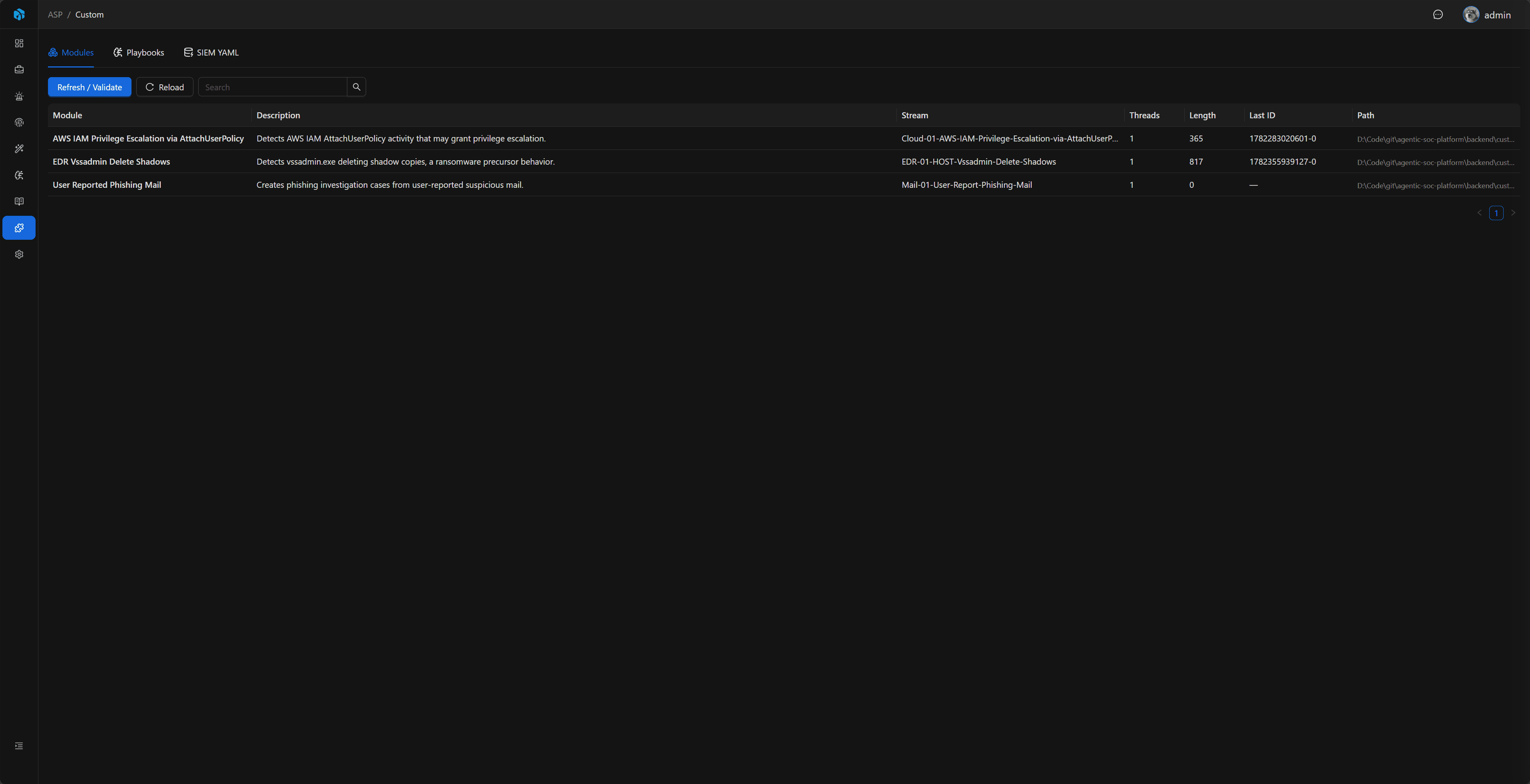
Main list fields:
| Field | Description |
|---|---|
| Module | The Module NAME. |
| Description | The Module DESC. |
| Stream | The Module STREAM_NAME; it must match the Stream name written by Webhook / ELK Index Action. |
| Threads | The Module THREAD_NUM. |
| Stream Health | Whether Redis Stream exists, length, first/last message IDs, and consumer group summary. |
| Path | Module script path. |
Stream Inspection
Module details can inspect Redis Stream in read-only mode:
- Stream basic information.
- Consumer group summary.
- Recent message JSON.
- Read a specific message by message ID.
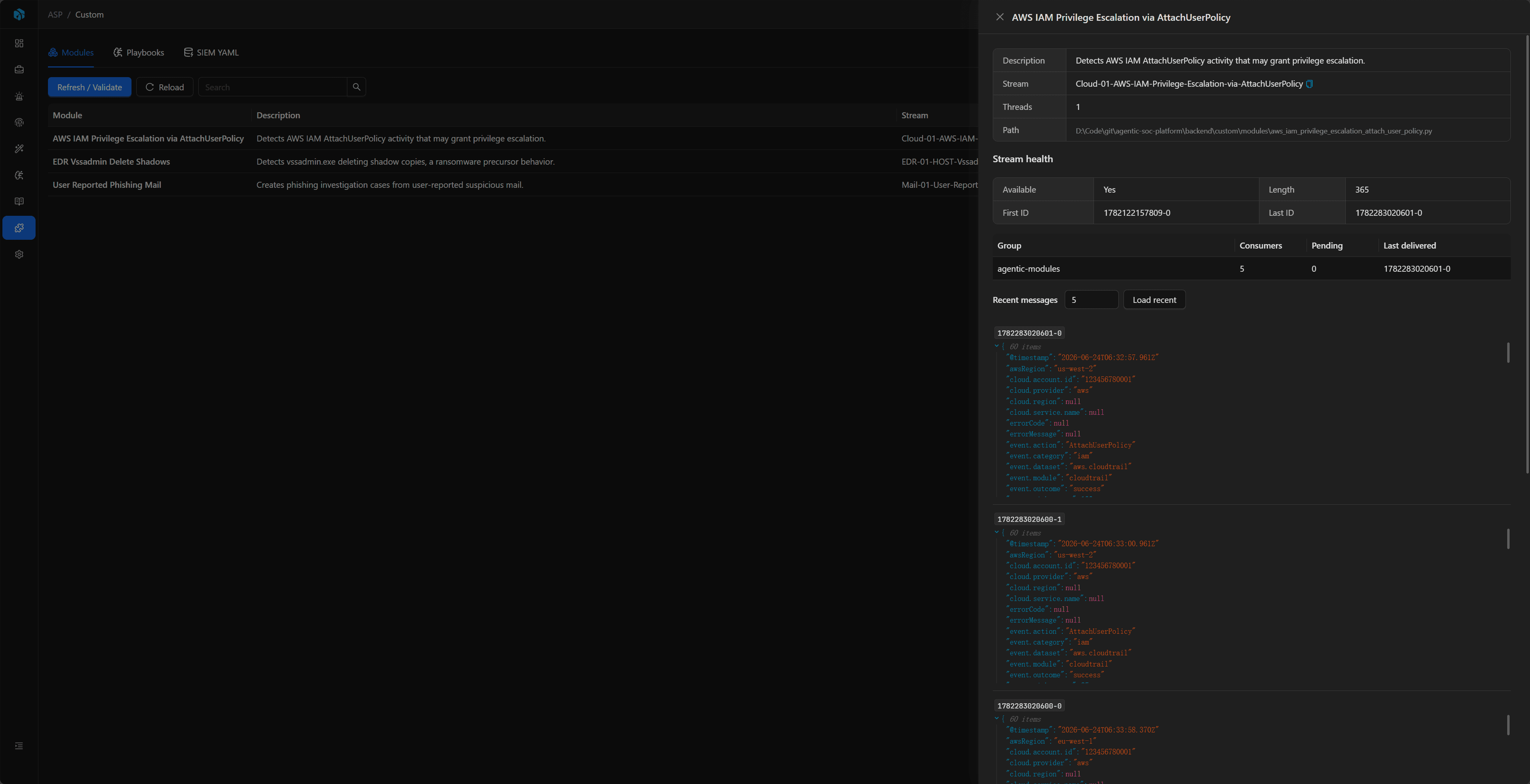
This feature is read-only. It does not write to the Stream, consume messages, delete the Stream, or trigger Module execution. It is useful for confirming whether SIEM alerts have entered the Stream and whether Stream status looks reasonable before and after Module consumption.
Playbooks
The Playbooks tab displays Playbook Definitions that can be run from a Case page. It only displays and validates definitions; it does not run Playbooks from Custom Console. To test a Playbook, use Run Playbook on a Case detail page.
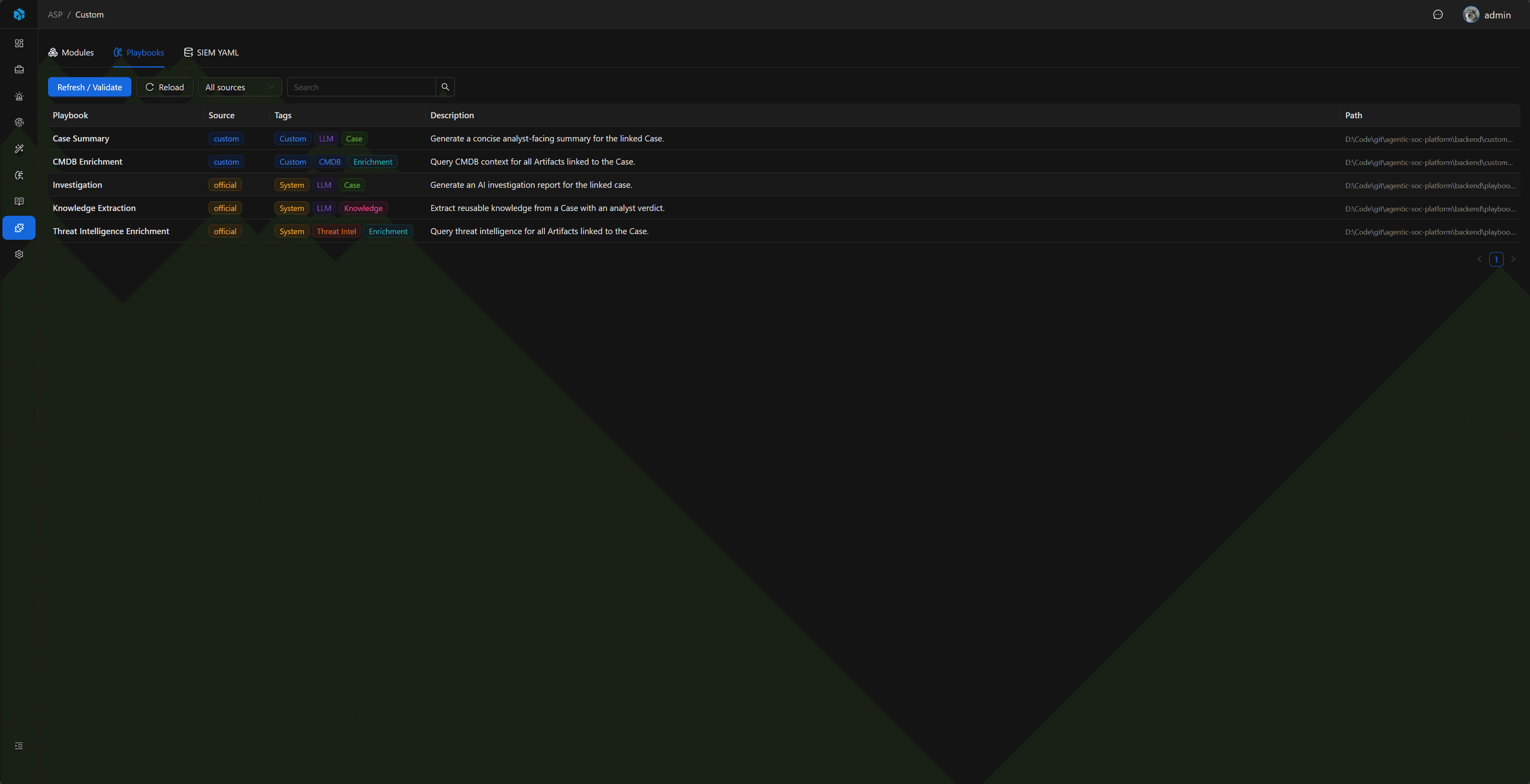
Main list fields:
| Field | Description |
|---|---|
| Playbook | The Playbook NAME. |
| Source | official or custom. |
| Tags | The Playbook TAGS, used for filtering and identifying purpose. |
| Description | The Playbook DESC. |
| Path | Playbook script path. |
Prompt files are not managed by Custom Console. A Playbook may keep prompts in code or call self.read_prompt("System") to read prompt files; Custom Console does not validate whether prompt files exist.
SIEM YAML
The SIEM YAML tab displays each YAML-defined index, backend, field count, key field count, and field table. It helps confirm whether the SIEM schema visible to Harness Agents matches expectations.
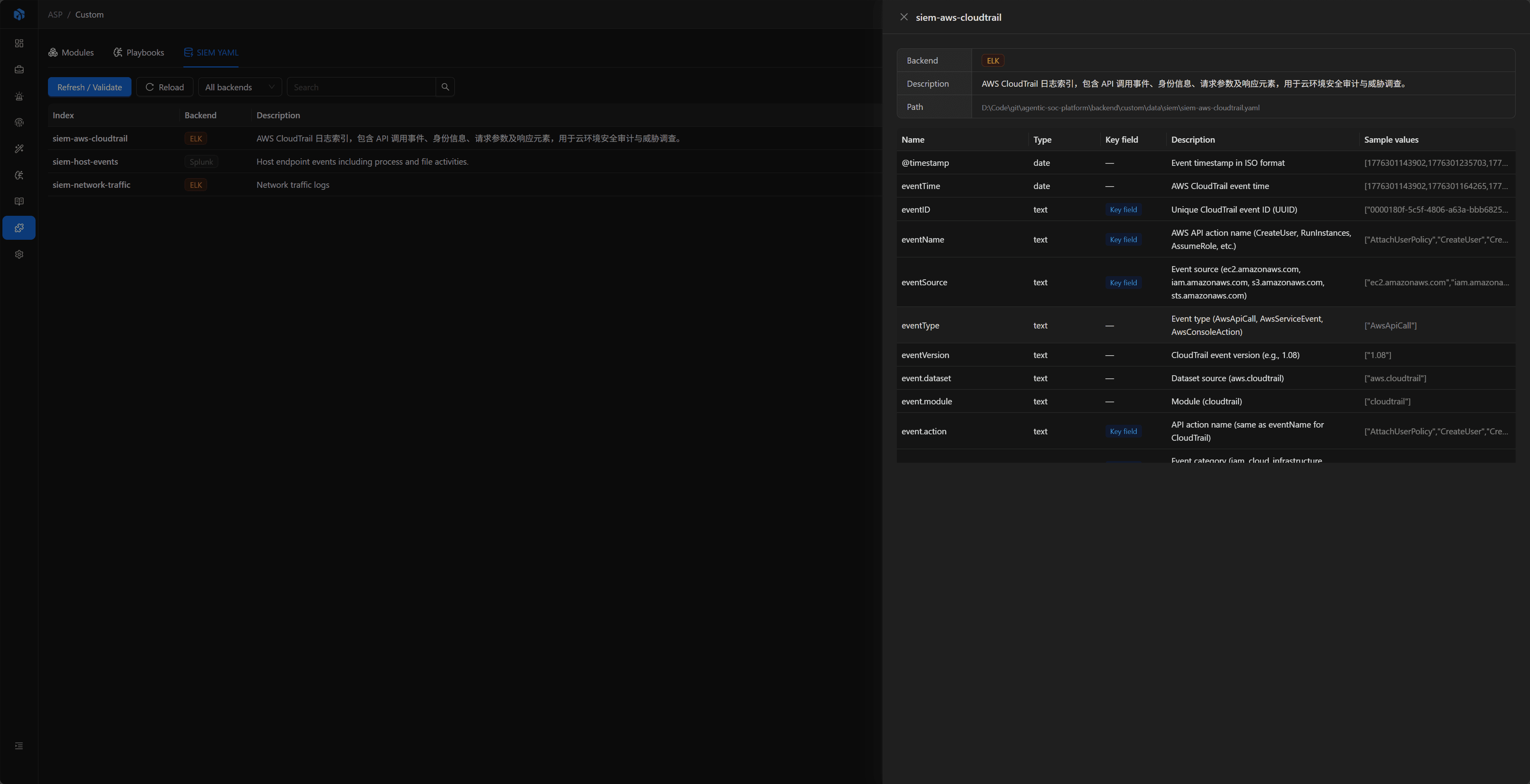
The field table includes:
| Field | Description |
|---|---|
| Name | Field name. |
| Type | Field type. |
| Key field | Whether it is marked as a key field. |
| Description | Field meaning. |
| Sample values | Example values. |
Creating or substantially updating YAML usually requires understanding log structure and query scenarios. Use the SIEM YAML documentation or the SIEM Index YAML Skill to help create it. Custom Console only displays and validates the final loaded result.
Next Steps
- Custom Development Overview — Learn how Module, Playbook, and SIEM YAML relate to each other in ASP.
- Module Development — Write Redis Stream consumption logic.
- Playbook Development — Write Case-triggered automation tasks.
- SIEM YAML — Maintain index field definitions queryable by Harness Agents.
- Custom Examples — Learn how source examples connect into end-to-end flows.
- Custom Content Deployment — Learn the Compose
custom/directory, dependency installation, and restart workflow.